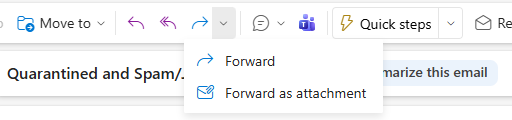
In Outlook (new):
- Click on the email to forward.
- Click the down arrow next to the forward button, choose Forward as attachment.
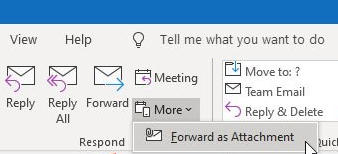
In Outlook (classic):
- Click on the email to forward.
- Click the More button, and choose Forward as Attachment.
Was this article helpful?
That’s Great!
Thank you for your feedback
Sorry! We couldn't be helpful
Thank you for your feedback
Feedback sent
We appreciate your effort and will try to fix the article